
Build a LLM from Scratch using MLX
Part 1 of 5 part series

You probably have a burning desire to grasp the inner workings of LLMs. By now, terms like Attention, Transformers, and Tokenizers are likely ringing in your ears, yet the actual mechanics often feel like they slip away just as quickly as you study them.
The truth is, the most effective path to comprehension is to roll up your sleeves and actually construct one.
I set out to develop a Nano LLM—a model with roughly 20.2M parameters—right on my Macbook Air. It turns out that Apple’s MLX framework makes this entirely possible.
You can find the full implementation here: https://github.com/samair/nanoLLM/blob/main/nanoLLM.ipynb
While I have spent time fine-tuning existing models, that always felt like just skimming the surface. The real insight comes from building from the ground up.
So, let’s break down the essentials for creating a Large Language Model from scratch.
Our requirements are simple:
A Macbook (M1 or later) to leverage the MLX framework.
A foundational grasp of Python.
Believe me, you don’t need a high-end GPU; a basic Macbook Air is more than sufficient.
Now, let’s walk through the architectural journey using a straightforward example.
This serves as the opening chapter of a five-part series, beginning with the Vocabulary of the model.
The Vocabulary of the model
Imagine a world where the vocabulary of english language is just 100 words, you can write sentences with maximum 5 of those words, we are keeping it simple so that we can understand and comprehend how models work, rest is just efficiency.
Now imagine each word in our vocabulary has an ID.
So the sentence “Cats chase mice” , could be represented as
[42,88,15]so if we had many such sentences we can refer it as
x =[[42,88,15]]where “x” holds many such sentences and is input to our model.
Lets try to get the length of such input sentences
seq_len = x.shape[1]seq_len becomes 3
Lets also get the positions of the words by calling
positions = mx.arange(seq_len)[None, :]positions becomes [[0,1,2]]
Now why do we care about positions ?
Good question, thanks to the nature of languages, words have different context based on where is it used. So it is important to realise and preserve positional information.
So lets take all that and write a python class which generates unique vectors for each word.
import mlx.core as mx
import mlx.nn as nn

class TokenAndPositionEmbedding(nn.Module):
    def __init__(self, maxlen: int, vocab_size: int, embed_dim: int):
        super().__init__()
        self.token_emb = nn.Embedding(vocab_size, embed_dim)
        self.pos_emb = nn.Embedding(maxlen, embed_dim)

    def __call__(self, x):
        seq_len = x.shape[1]
        # Using mx.arange instead of jnp.arange
        positions = mx.arange(seq_len)[None, :]
        return self.token_emb(x) + self.pos_emb(positions)
What this class does is create a unique vector, something like [1.0,0.2,-0.4] for each of the words (tokens)
So going by our example “Cats chase mice” becomes
[1.0, 0.2, -0.4],[-0.1, -0.8, 1.0],[0.9, 0.1, -0.1]
Notice the vectors i wrote are all 3 in length, which represents the number dimensions. Think of them as properties of a word, is the word a noun/verb, where does this appear in a sentence, how it changes meaning of the word, etc.
In real world dimensions are large, GPT-2 had a version with 768 embedding dimensions, GPT-3 has 12288 dimensions.
Notice the init method, we use this fancy method nn.Embedding
 def __init__(self, maxlen: int, vocab_size: int, embed_dim: int):
        super().__init__()
        self.token_emb = nn.Embedding(vocab_size, embed_dim)
        self.pos_emb = nn.Embedding(maxlen, embed_dim)
This is where we start using MLX, nn.Embedding helps you build these vectors we spoke about. Think of it like a massive generator of “matrix/vector”
So if we need a Embedding generator for sentences with a max length of 5, with 4 dimensions, we say
nn.Embedding(5,4)
Now remember people talk about Tokenizer, all that it does is generate IDs for your tokens(words).
For the sentence “The Robot built a story”
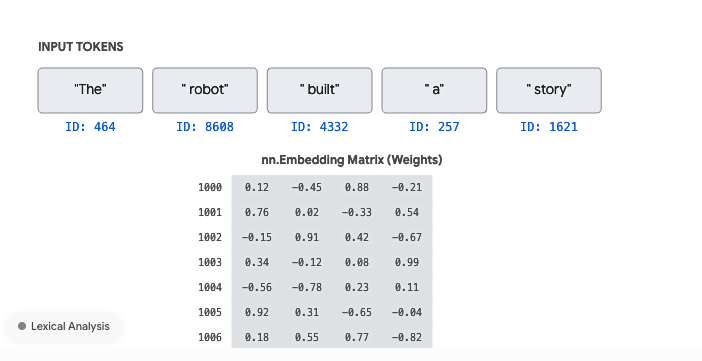
the TokenAndPositionEmbedding class helps build a vector using the tokenizer.
So in short it uses GPT-2 Tokenizer , which we will talk about in upcoming chapters, to get the IDs first and then generate positional embeddings, converting the sentence to
[1.0, 0.2, -0.4],[-0.1, -0.8, 1.0],[0.9, 0.1, -0.1],[-0.13, -0.8, 3.0],[-0.8, -0.8, 1.0]
Now that we understood how the vocabulary of the Model works, try to run the full code to see what you could comprehend https://github.com/samair/nanoLLM/blob/main/nanoLLM.ipynb
Next chapter would talk about Attention, All that you need.